Does Starlink Work Well in Heavy Rain? What to Expect
See how Starlink performed during a torrential Central Florida storm, including real speed tests from our Ocala showroom and what heavy rain can mean for satellite internet.
Does Starlink Work Well in Heavy Rain? What to Expect
A real-world look at how Starlink performs in Florida thunderstorms, including speed tests we ran during a torrential storm at our Ocala showroom.
Florida weather can go from sunshine to a wall of rain in a matter of minutes.
That naturally raises an important question for Starlink users:
Does Starlink still work when the rain gets heavy?
The short answer is yes, usually — but very heavy rain can affect performance.
Starlink uses radio signals between your dish and satellites in low Earth orbit. Like other satellite systems, those signals can be weakened when they pass through intense rain.
The industry term for this is rain fade.
But rain fade does not mean that every thunderstorm will knock Starlink offline.
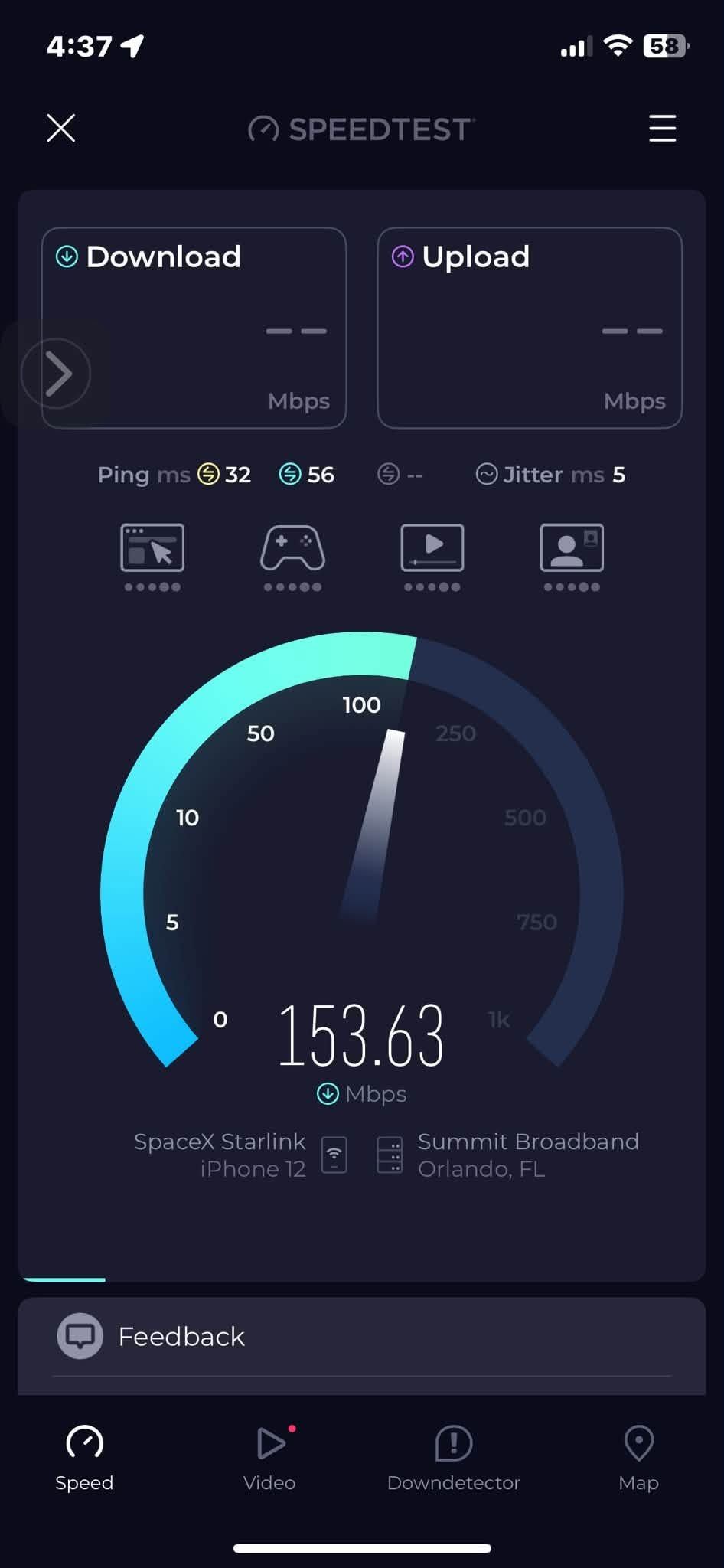
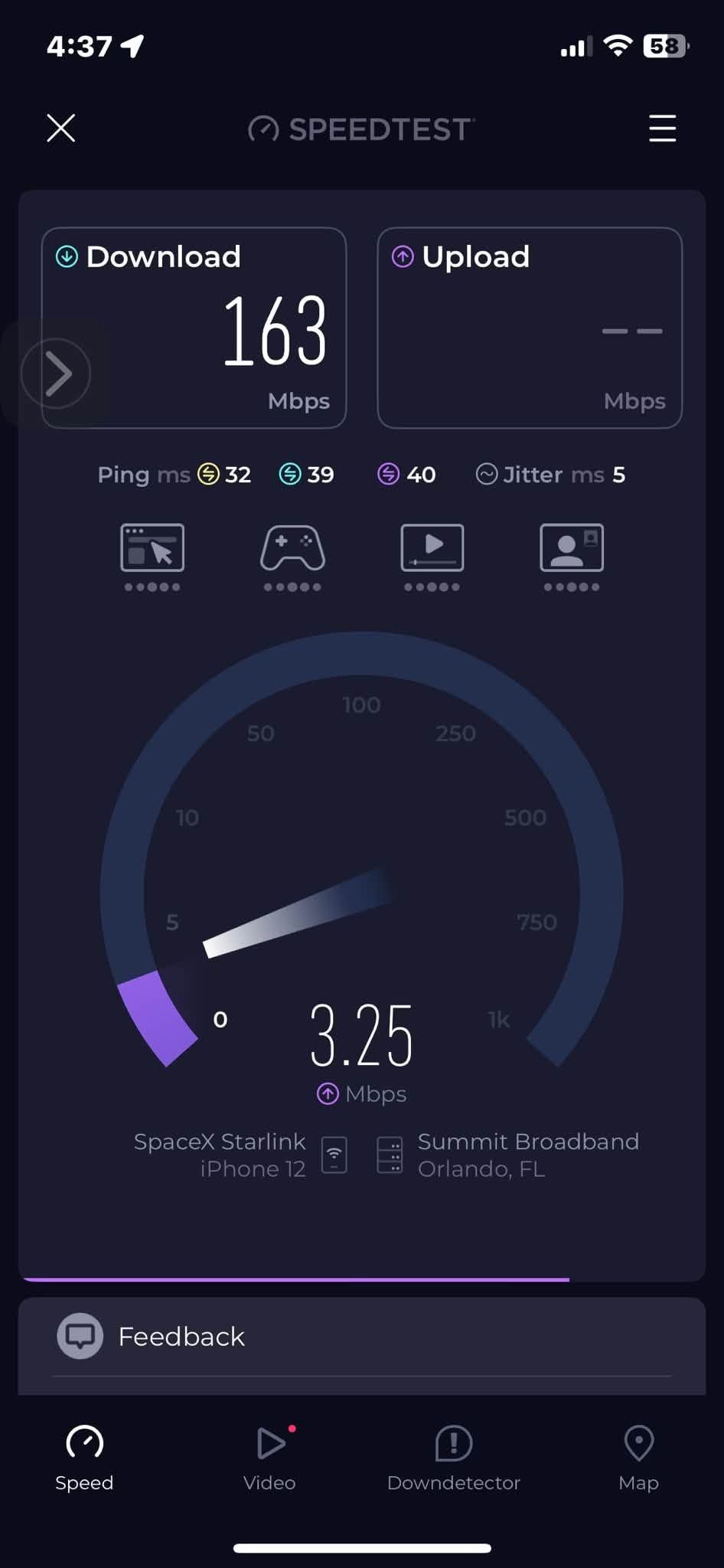
In fact, during a torrential Central Florida storm at our Ocala showroom, we tested our own Starlink connection and recorded download speeds of approximately 154 to 163 Mbps while heavy rain was moving through the area.
That does not mean every Starlink system will perform the same way in every storm.
But it does show that heavy rain does not automatically mean your Starlink connection will stop working.
Our Real-World Starlink Test During an Ocala Downpour
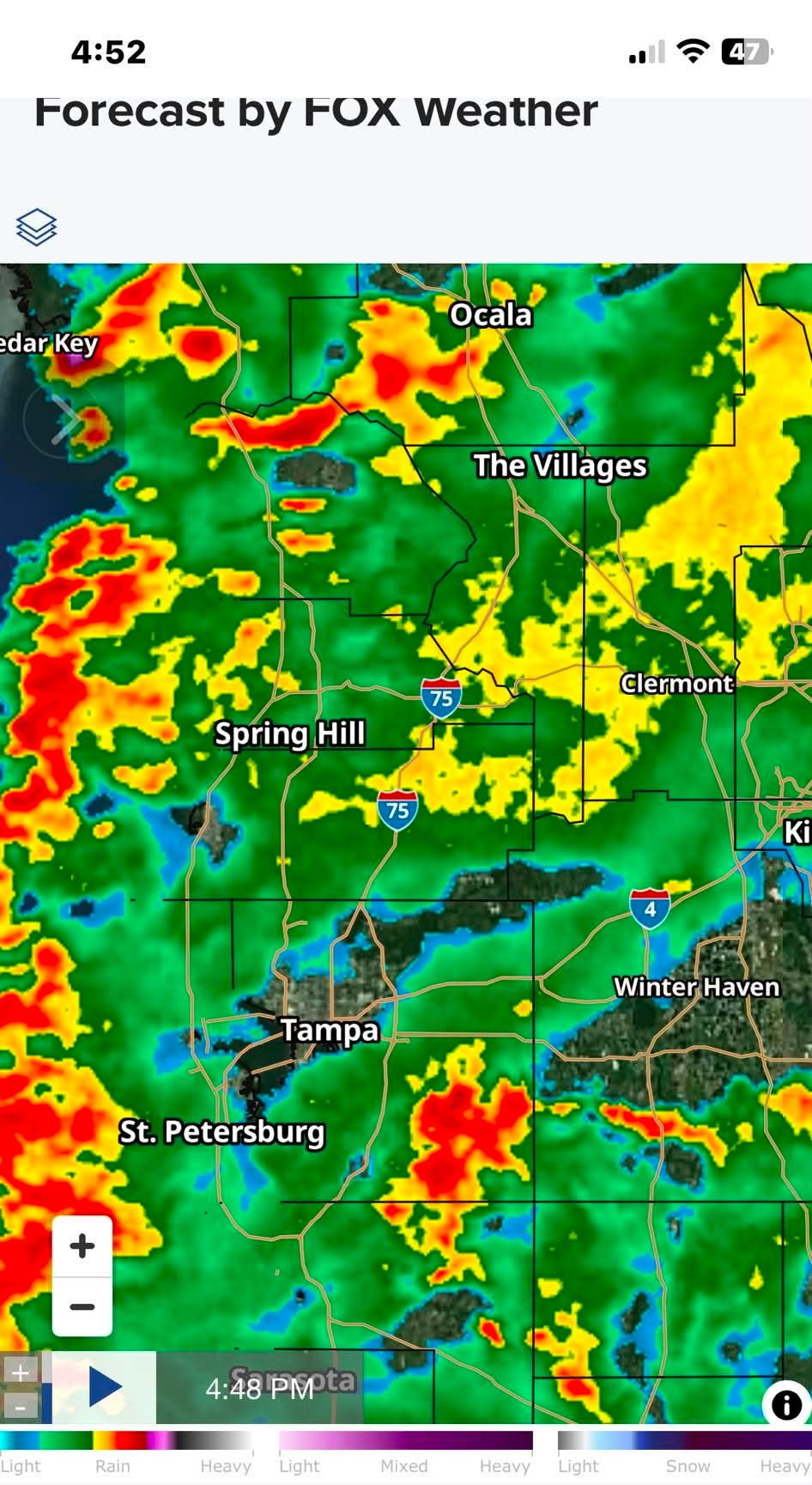
On August 26, 2026, a strong thunderstorm moved through Ocala and much of Central Florida.
The weather radar showed areas of very heavy rain and thunderstorms around Ocala, The Villages, Spring Hill, Tampa, and surrounding areas.
At our showroom, the rain was coming down hard enough that it gave us a good opportunity to see what our Starlink system would actually do under real Florida storm conditions.
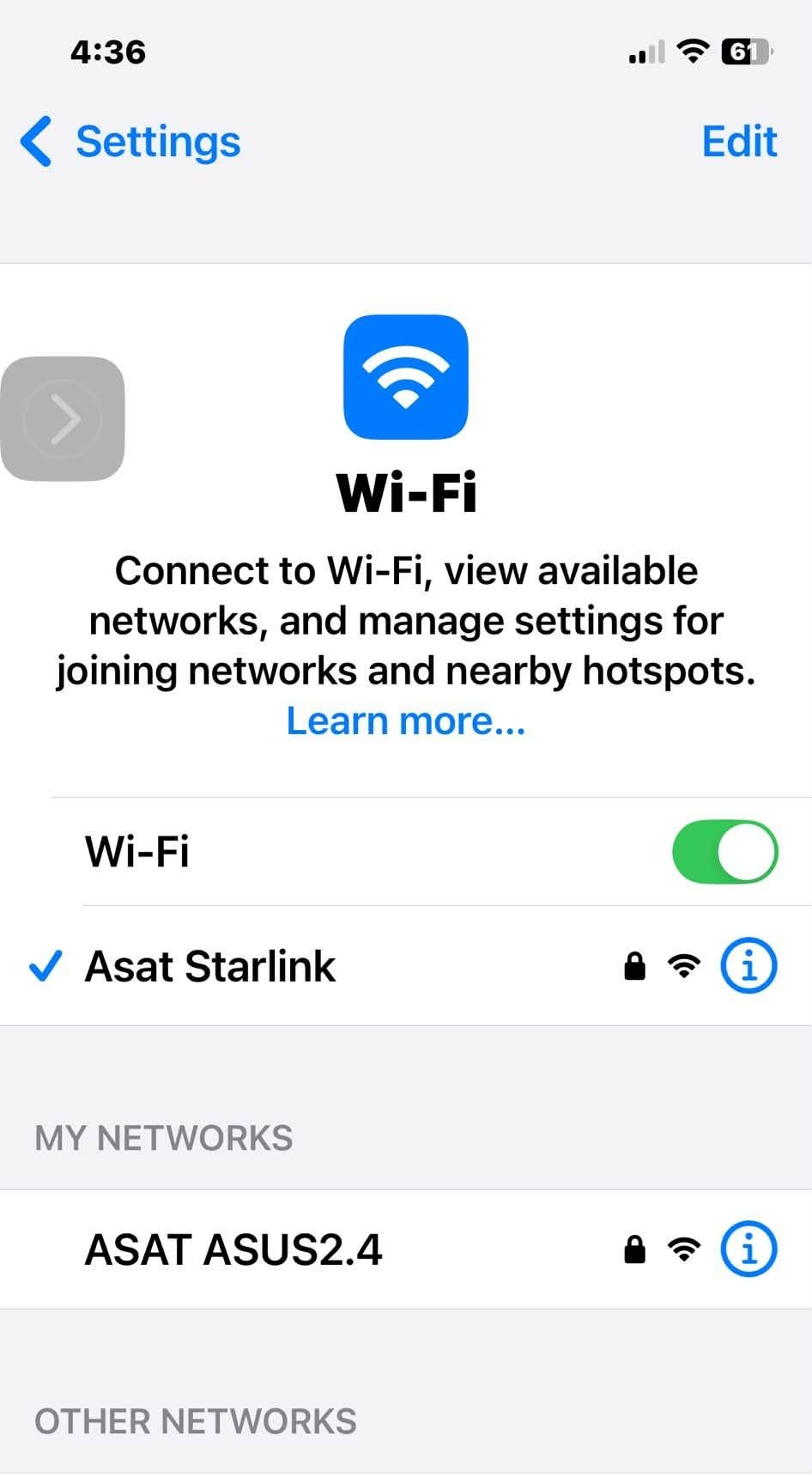
Our iPhone was connected directly to our ASAT Starlink Wi-Fi network, and we ran several internet speed tests.
During the storm, we recorded:
- Approximately 154 to 163 Mbps download
- About 32 milliseconds of ping
- Approximately 5 milliseconds of jitter
- One captured upload test showed approximately 3.25 Mbps
Those are not laboratory measurements, and they should not be interpreted as guaranteed Starlink performance during every storm.
But in this particular torrential downpour, our Starlink connection remained fast and very usable.
That is considerably more useful to us than simply saying, “Starlink should work in the rain.”
We tested it.
Our Starlink connection recorded approximately 154 Mbps download during the torrential storm at our Ocala showroom.
How Heavy Rain Can Affect Starlink
Starlink operates at microwave frequencies that can be affected by water in the atmosphere.
When a signal passes through very heavy precipitation, some of the radio energy can be absorbed or scattered.
That loss is called signal attenuation.
If enough attenuation occurs, you may experience:
- Slower download speeds
- Slower upload speeds
- Higher latency
- Brief interruptions
- Temporary loss of service during the most intense part of a storm
How much effect you see depends on several factors, including the intensity of the rain, the thickness of the storm cell, your installation, surrounding obstructions, network conditions, and the signal path at that particular moment.
What Is Rain Fade?
Rain fade is the weakening of a satellite radio signal as it passes through precipitation.
It is not unique to Starlink.
Satellite television, satellite internet, microwave links, and other high-frequency radio systems can all experience some degree of rain attenuation.
What makes Starlink somewhat different from traditional geostationary satellite systems is that it communicates with a large constellation of satellites in low Earth orbit rather than depending on one satellite approximately 22,000 miles above the equator.
Starlink's network is designed to continuously hand the connection between satellites as they move across the sky.
That does not eliminate rain fade, but it helps explain why a Starlink system may continue working well through weather that customers expect would completely interrupt satellite service.
Does Starlink Go Out in Every Thunderstorm?
No.
Our own Ocala test is a good example.
We were experiencing a torrential Florida storm, yet our Starlink connection was still delivering more than 150 Mbps download speed during our tests.
Many thunderstorms may cause little noticeable effect.
Others may cause temporary slowing.
A particularly intense rain cell directly in the radio path may cause a brief interruption.
The important point is:
Storm intensity matters more than the fact that it is simply raining.
A light rain shower and a severe thunderstorm are very different RF environments.
Why One Starlink Installation May Perform Better Than Another
Two homes in the same neighborhood can experience different Starlink performance during the same storm.
The installation itself matters.
A Starlink dish should have the clearest possible view of the sky in the area identified by the Starlink app.
Trees and other obstructions can cause short interruptions even in perfect weather.
Add heavy rain to an already marginal installation and the customer may notice considerably more interruptions than someone whose dish has an unobstructed view.
That is why we pay close attention to:
- Tree coverage
- Rooflines
- Nearby buildings
- Mounting location
- Cable routing
- Dish stability
- Future tree growth
- The obstruction information shown in the Starlink app
A storm cannot be controlled.
The installation can.
Wet Trees Can Make an Existing Obstruction Worse
Central Florida has no shortage of trees.
Oak trees, pines, palms, and heavy vegetation can already create Starlink obstruction problems.
When foliage becomes saturated during a storm, the radio environment can become more difficult.
If a Starlink dish has branches partially obstructing its view during dry weather, wet foliage may make an already marginal path worse.
This is one reason we prefer to solve obstruction problems when the system is installed rather than hoping the dish will work around them.
What About Clouds and Fog?
Ordinary cloud cover by itself is usually not something a Starlink customer needs to worry much about.
The greatest weather-related concern is typically very heavy precipitation, not simply an overcast sky.
Florida can stay cloudy for hours while Starlink continues operating normally.
A dense thunderstorm producing extremely heavy rainfall is a different situation.
Florida Storms Can Actually Work in Starlink's Favor
That may sound strange, but many Central Florida thunderstorms are intense and relatively short-lived.
An afternoon storm may build rapidly, dump an enormous amount of rain, and then move away.
If Starlink experiences a temporary slowdown or interruption during the strongest part of the storm, service may recover quickly as the heavy rain cell moves out of the signal path.
A slow-moving tropical system, hurricane rain band, or stalled weather front may create a different experience because heavy precipitation can remain in the area much longer.
Lightning Is a Different Problem
Rain fade and lightning damage are two completely different issues.
Heavy rain primarily affects the radio signal.
Lightning and electrical surges can damage the equipment.
A nearby lightning event can potentially affect:
- The Starlink dish
- Router
- Power supply
- Ethernet equipment
- Network switches
- Wi-Fi access points
- Other connected electronics
No installation can guarantee protection from lightning.
However, good cable routing, proper installation practices, surge protection where appropriate, and attention to electrical grounding and bonding requirements can help reduce unnecessary risk.
A Good Starlink Installation Starts With a Clear View
For reliable Starlink service, the most important thing you can control is the location of the dish.
Before installation, use the Starlink app to check for obstructions.
Look for:
- Tree limbs
- Nearby roofs
- Chimneys
- Towers
- Utility structures
- Other buildings
Do not assume that putting the dish higher automatically solves every problem.
The goal is to find a location that gives the dish the clear sky view it needs while still allowing for a safe and secure installation.
The Mount Matters Too
Florida weather places a lot of stress on outdoor equipment.
A Starlink mounting system should be secure enough to handle normal wind and weather without excessive movement.
That becomes even more important during thunderstorms and tropical weather.
Depending on the property, the dish may be installed on:
- A roof
- Fascia or eave
- Pole
- Mast
- Tower
- Other suitable mounting structure
The correct mounting method depends on the building, obstructions, desired dish location, and property conditions.
Safe Checks You Can Make During or After a Storm
There is no reason to climb onto a wet roof to investigate a Starlink problem.
Start with the Starlink app.
Check:
- Whether Starlink reports an outage
- Obstruction information
- Router status
- Dish status
- Recent interruptions
- Whether service returns as the heavy rain passes
You can also run a speed test once conditions are safe and compare the results with what you normally receive.
Keep in mind that internet speed can vary even when there is no storm.
Congestion, Wi-Fi conditions, the device you are using, and Starlink network demand can all affect a speed test.
When a Storm Problem May Actually Be an Installation Problem
If Starlink only experiences a brief interruption during an exceptionally heavy thunderstorm and immediately returns to normal afterward, there may be nothing wrong with the installation.
But if service drops every time moderate rain begins, or continues performing poorly after the storm has passed, it is worth investigating.
Possible problems include:
- Tree obstructions
- A poor dish location
- Mount movement
- Cable damage
- Loose or damaged connections
- Power problems
- Router or network issues
- Storm-related equipment damage
Do not automatically assume every problem during bad weather is rain fade.
Sometimes the weather merely exposes an existing weakness.
Extending Starlink to Another Building
Starlink can provide excellent internet service at a rural property, but the best location for the dish is not always the same building where internet is needed.
For example, you may have Starlink at the house but need internet at a:
- Barn
- Workshop
- Detached garage
- Guest house
- Office
- Security camera location
In those situations, a point-to-point wireless bridge can often distribute the Starlink connection to another building without purchasing another internet service.
John’s Antennas also designs and installs these types of rural network-distribution systems.
Does Starlink Work Well in Heavy Rain?
Based on both the technology and what we have observed in the field, the answer is:
Usually, yes.
Heavy rain can reduce performance and very intense storms can cause temporary interruptions.
But that does not mean Starlink shuts down every time a Florida thunderstorm arrives.
During our own torrential storm test in Ocala, our Starlink connection continued delivering approximately 154 to 163 Mbps download speeds.
That was a real-world test at our own location—not a claim printed on a box.
Your results may be different depending on your property, installation, obstructions, weather intensity, and Starlink network conditions.
But our experience demonstrates that a properly installed Starlink system can remain surprisingly capable even during very heavy Florida rain.
Professional Starlink Installation in Central Florida
John’s Antennas and International Satellite & Antenna Service have worked with satellite and communications systems throughout Central Florida since 1983.
We can help with:
- Starlink installation
- Obstruction problems
- Custom mounting
- Tower installations
- Rural properties
- Starlink network distribution
- Point-to-point wireless connections
- Wi-Fi distribution between buildings
If you are considering Starlink or are having trouble with an existing installation, call John and let’s discuss the property, trees, mounting options, and what you want the system to accomplish.
The goal is not simply to make Starlink work on a sunny afternoon.
The goal is to build an installation that gives it the best possible chance of working when Florida weather shows up.
Frequently Asked Questions
Does heavy rain cause Starlink to disconnect?
It can. Very heavy precipitation can weaken the satellite signal and cause slower speeds, higher latency, or brief interruptions. However, Starlink does not automatically disconnect every time it rains.
Does Starlink work during Florida thunderstorms?
Often it does. During a torrential thunderstorm at our Ocala showroom, we recorded approximately 154 to 163 Mbps download speeds over our Starlink connection. Performance will vary by installation, storm intensity, obstructions, and network conditions.
What is rain fade?
Rain fade is the weakening of a radio signal as it passes through precipitation. Satellite systems operating at microwave frequencies can experience signal attenuation during heavy rain.
Do clouds interfere with Starlink?
Normal cloud cover generally has much less effect than very heavy precipitation. Dense storm cells producing heavy rain are more likely to noticeably affect the connection.
Can trees make Starlink worse during rain?
Yes. Trees that already obstruct part of the dish's view can become a greater problem when foliage is wet. A clear view of the sky remains one of the most important parts of a reliable Starlink installation.
Can I improve Starlink performance during a storm?
You cannot eliminate rain fade, but you can make sure the system starts with the best possible installation. A clear sky view, secure mounting, proper cable routing, and minimizing obstructions can reduce avoidable interruptions.
Should I move my Starlink dish during a storm?
No. Do not climb onto a roof or attempt to reposition outdoor equipment during a storm. Use the Starlink app to check system status and wait until weather conditions are safe before inspecting anything outside.
Is Starlink equipment waterproof?
Starlink equipment is designed for outdoor exposure and weather resistance, but it should not be treated as indestructible or immune to water-related damage. Damaged cables, connectors, or installation components should be inspected if problems remain after a storm.
Why does my Starlink keep dropping when my neighbor's does not?
The two installations may have different obstruction levels, mounting locations, trees, dish views, equipment conditions, Wi-Fi environments, and network usage. Two nearby properties do not necessarily have identical Starlink performance.
Can John’s Antennas extend Starlink to a barn or second building?
Yes. Depending on the property, a point-to-point wireless bridge can distribute a Starlink connection to a barn, shop, office, guest house, or other building without running a cable the entire distance.
Pleased with our services? Please take a moment to give us a review on Google.
Thank you!
John